
Connectors
A connector bridges the tag tree to exactly one external system — a fieldbus, a network service, a cloud endpoint, or a built-in node service. Connectors are the only things that perform I/O; the engine and your scripts never touch a wire or a socket directly. Everything a connector exchanges appears as ordinary tags.
For the full list of what ships, see the Connector catalog.
Three kinds
Section titled “Three kinds”| Kind | Bridges… | Examples |
|---|---|---|
ot | physical buses / fieldbuses | Modbus (TCP/RTU), Serial, EtherCAT, Siemens S7, JasperMate, LiDAR |
it | networks, message buses, clouds | MQTT (incl. Sparkplug B), InfluxDB, Modbus Server, HMI |
system | built-in node services | IDE, JX (cloud bridge), Persist, Tools, Logic Cycle |
ot and it connectors are what you add and configure for a project. system connectors are the
node’s own machinery and are managed for you.
Each connector owns a small set of tags
Section titled “Each connector owns a small set of tags”A connector instance is identified by a type (e.g. modbus) and an id (e.g.
vsd_ethernet). Around that id, it owns a predictable handful of tags:
- What you edit (under
__sys/node/user/connectors/<type>/<id>/): itsconfig(the JSON the IDE form produces) and itsenabledswitch. - What the node reports (under
__sys/node/service/connectors/<type>/<id>/): live status, connected/disconnected, error list, latency, and other diagnostics — read-only.
Plus per-type tags the IDE reads to render the catalog and config forms. You normally never touch these tags by hand — the IDE (and the AI agent) read and write them for you — but it’s worth knowing that “configuring a connector” simply means “writing its config tag”.
Lifecycle: configure → enable
Section titled “Lifecycle: configure → enable”Every connector, regardless of kind, follows the same lifecycle:
- Configure. Fill in the connector’s form and Save. This writes the
configtag. The connector materialises the tags it will read/write, but does no I/O yet. - Enable. Flip the Enabled toggle. The node validates the config, instantiates the connector, and it begins talking to its device or service.
- Reconfigure while running. Change the config and save: cosmetic changes (a scale factor, a poll rate) are applied in place; connection- or mapping-shape changes trigger a clean restart. A bad config is rejected atomically — the previous working setup keeps running and the error is surfaced for you to fix.
- Disable. Turn the toggle off and the connector stops and closes its connection. Its tags and their ownership remain, so the picture in the IDE stays stable.
:::caution[A disabled connector does zero I/O] Disabled means inert — no polling, no publishing, no socket open, nothing on the wire. All traffic happens only while enabled. This is also what makes simulation safe. :::
Direction: in and out
Section titled “Direction: in and out”This is the concept that most often trips up newcomers, so it’s worth getting right.
Every mapping declares a direction, per tag, in the connector’s config. JasperNode never infers it from the protocol:
in= device → tag (an input). The connector reads the field and writes the tag. The connector is the tag’s owner/writer.out= tag → device (an output). The connector watches the tag and pushes its value to the field. Scripts/UI set the value; the connector forwards it.
There is no bidirectional mapping. A setpoint you both command and read back is two tags — one
out, one in.
Who is allowed to write
Section titled “Who is allowed to write”While a connector is enabled and owns a tag as an in, nothing else may overwrite that tag
— not scripts, not the UI. The field is the source of truth, and the engine enforces it. out tags
are the opposite: scripts, the UI and the AI set them, and the connector forwards the commanded
value.
This is the JasperNode version of the PLC “one writer per tag” discipline, and it’s enforced rather than conventional.
Cold-start
Section titled “Cold-start”When a connector starts (first boot, restart, or disable→enable), it reads its inputs, writes the tags, and re-announces those values so that dependent scripts run even if a restored value happens to equal the device’s current value. You don’t configure this; it just means logic reacts correctly after every (re)start.
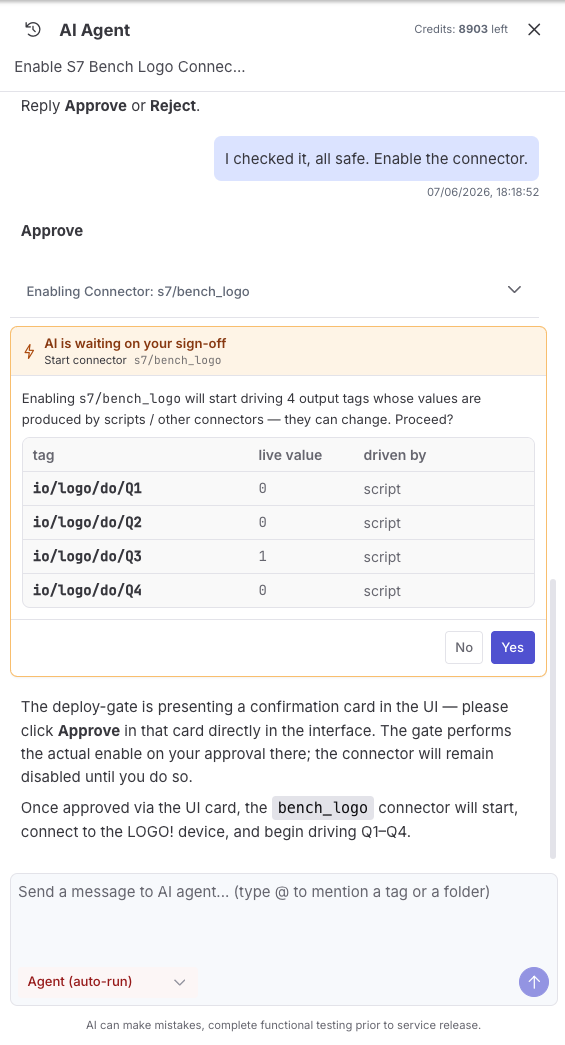
Because cold-start also pushes every out tag to the field, enabling a connector that owns
outputs is a real-world action, not a cosmetic one. When the AI agent is the one enabling it, the
change is held at the Deploy Gate: the agent names the exact
output that would start being driven and waits for your explicit sign-off before flipping it on.
Communication loss
Section titled “Communication loss”If a connection drops, the connector reports disconnected, the affected input tags’ quality
becomes stale (they keep their last value), and the connector reconnects with backoff. On
reconnect it re-reads inputs and re-publishes outputs. A clean, expected disconnect is a normal
lifecycle event, not an error.
OT vs. IT — practical differences
Section titled “OT vs. IT — practical differences”Both kinds share the same config-and-enable lifecycle, the same tag layout, and the same in/out
model. What differs:
- OT (fieldbus) connectors run on a cycle — they poll/exchange at a configured cycle time (or react to push events, like JasperMate). They carry real-world consequences: strict direction enforcement, output assertion on (re)start, and the rule that two connectors must never drive the same physical output. The fieldbus drivers run as native, fault-isolated code for performance.
- IT (network/cloud) connectors deal in subscriptions, requests and publishes. Here
inmeans subscribe / poll / accept a request and write the result into a tag, andoutmeans publish / insert / respond by forwarding a tag’s value. A single IT connector may do both directions (MQTT, Modbus Server, HMI) or one only (InfluxDB is output-only). They must tolerate the network dropping and reconnect cleanly.
Status at a glance
Section titled “Status at a glance”A connector’s status is one of:
| Status | Meaning |
|---|---|
stopped | disabled / not running |
starting | enabling; connection not yet open |
connected | running and talking to the device/service |
disconnected | was connected, lost the link, retrying |
error | a runtime error (see its error list) |
config_error | the configuration was rejected |
crashed | a fieldbus driver fault (auto-recovery applies) |
Faults don’t spread
Section titled “Faults don’t spread”Connectors are isolated from each other and from the engine. A fault is contained to one connector type, and fieldbus drivers add per-instance crash trapping plus auto-rollback: if a connector crashes repeatedly soon after a change, the node restores the previous working version on the next restart and tells you what changed. The rest of the node keeps running throughout — see Architecture → faults.
Configuring a connector in the IDE
Section titled “Configuring a connector in the IDE”Each connector type has its own page under the Connector Manager, with the same shape: an Instances list, and an editor split into the connection settings, the value mapping, and a live diagnostics panel. The Modbus example below shows the transport and host/port, the polling cycle time, the tags’ base path, and a mapping table where each row sets a name, register space, address, direction and data type.
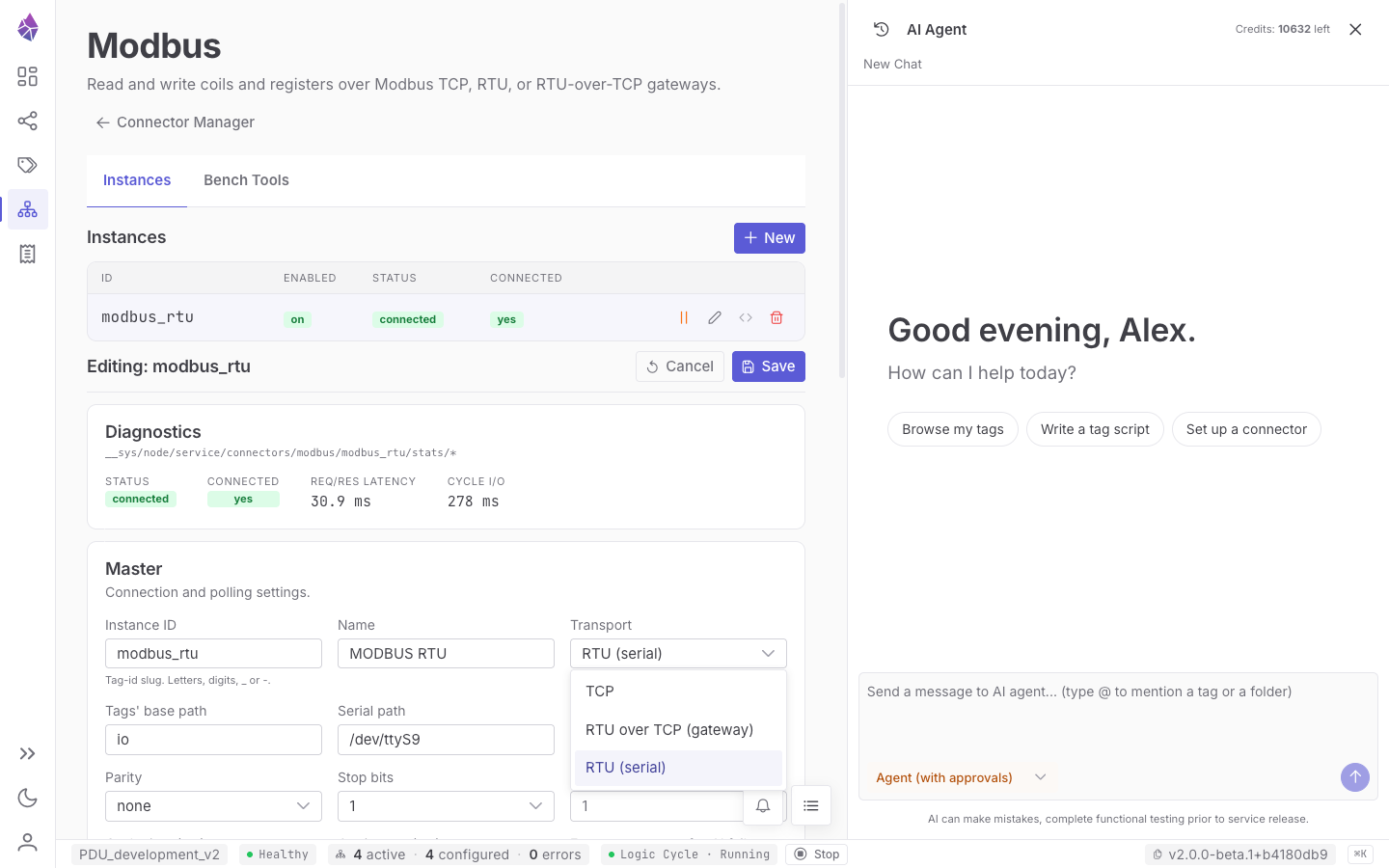
The config forms are tailored per connector type, but the AI agent can also create and edit any connector for you from a plain-language description — it writes the same config tags the form does.